Brich Brush Stamp Set for Procreate: Elevating Digital Wilderness Art
In the evolving landscape of digital illustration, efficiency and authenticity often compete for attention. Artists and designers frequently find themselves balancing the need for rapid production with the desire for hand-crafted texture. The Brich Brush Stamp Set for Procreate addresses this tension by offering a curated collection of high-resolution, hand-drawn silhouettes designed to streamline the creative process without sacrificing artistic integrity. This tool is not merely an asset library; it is a functional component of a broader workflow aimed at producing nature-inspired, mystical, or wild-themed content with professional consistency.
Whether you are a freelance illustrator working on book covers, a graphic designer creating social media assets, or an educator developing visual materials, integrating specialized stamp sets into your routine can significantly alter your output quality and speed. The Brich collection specifically targets creators who need to inject the untamed beauty of the wilderness into their projects quickly. By understanding how these brushes function within a standard design pipeline, users can maximize their utility from the initial sketch phase through to final export.
Understanding the Asset Structure and Compatibility
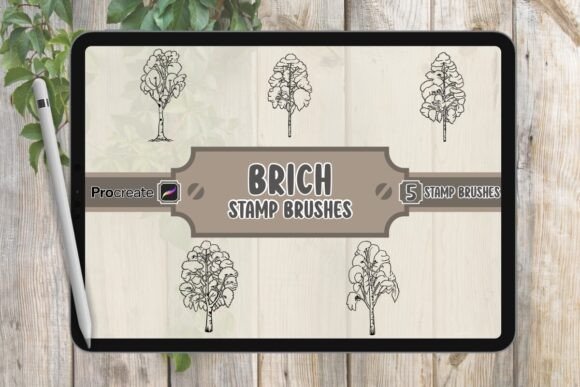
Before diving into execution, it is essential to understand what constitutes the Brich Brush Stamp Set for Procreate. The package is delivered as a comprehensive resource bundle containing three distinct elements: a native Procreate file (.brushset) featuring five unique Brich figures, a JPG image preview for quick reference, and a Read Me.pdf document detailing installation and usage guidelines. This structure ensures that the asset is immediately compatible with the iPad environment, requiring no third-party conversion tools or complex setup procedures.
The core value lies in the .brushset file itself. Unlike generic shape tools found in standard vector software, these are raster-based stamps optimized for Procreate's engine. They are pre-configured to handle opacity, blending modes, and size scaling seamlessly. For professionals managing tight deadlines, this compatibility means zero friction during the import phase. You do not need to spend time adjusting stroke settings or worrying about pixelation when resizing large elements. The set is engineered to maintain sharp edges and clear details regardless of the canvas resolution, provided the user adheres to standard high-DPI practices common in digital publishing.
Integrating Brich Silhouettes into Your Creative Workflow
The true power of the Brich Brush Stamp Set emerges when it is woven into specific stages of a project lifecycle. It is most effective when used as a foundational layering tool rather than a standalone element. Consider the typical workflow for a digital illustration: concept, blocking, detailing, and refining. These stamps fit naturally into the blocking and detailing phases, allowing artists to establish mood and composition rapidly.
Pre-Production and Planning
During the planning stage, the included JPG preview serves as a critical reference tool. Before opening Procreate, creators can review the five available Brich figures—ranging from howling poses to prowling stances—to determine which silhouette best fits the narrative arc of the piece. This decision-making process helps in storyboarding. If you are designing a series of posters or a sequence for a children's book, selecting the right pose early ensures narrative continuity. The variety in the set allows for dynamic storytelling without the need to draw every creature from scratch.
Execution and Layering
Once inside Procreate, the implementation is straightforward but requires strategic layer management. A common technique involves placing the Brich stamp on a dedicated layer below your main subject but above your background texture. Because these are hand-drawn silhouettes, they respond exceptionally well to blending modes such as "Multiply" or "Overlay." This interaction allows the dark tones of the Brich figure to interact with underlying color washes, creating depth and atmospheric perspective. For example, if you are creating a mystical forest scene, stamping a howling Brich onto a layer with a soft fog texture creates an immediate sense of scale and mystery.
Post-Processing and Refinement
After the initial placement, the workflow shifts to refinement. While the stamps are high-resolution, they serve as a starting point. Professional artists often use the Liquify tool or Warp feature in Procreate to subtly adjust the stance of the Brich figure, ensuring it aligns perfectly with the lighting direction of the scene. This step transforms a static stamp into a custom asset that feels organically integrated into the artwork. The versatility of the set allows for non-destructive editing; since each stamp is applied as a separate instance, you can mask, erase, or recolor sections without affecting the original brush data.
Practical Use Cases Across Industries
The applications for the Brich Brush Stamp Set for Procreate extend far beyond personal hobbyist art. Its utility spans various professional sectors where visual storytelling and branding require distinct, nature-centric imagery.
- Publishing and Book Design: Authors and publishers often need cover art that conveys genre instantly. A howling Brich silhouette against a moonlit sky communicates fantasy or adventure immediately. Using these stamps allows cover designers to iterate through multiple concepts in minutes rather than days, facilitating faster client approvals.
- Brand Identity and Logos: Small business owners in the outdoor, wellness, or eco-friendly sectors can utilize these silhouettes to craft memorable logos. The clean lines of the hand-drawn figures translate well into vector tracing workflows (using apps like Vectornator or Adobe Illustrator) after being stamped in Procreate, serving as a robust base for brand marks.
- Social Media and Marketing: Content creators and marketers require consistent visual themes to build audience engagement. The Brich set provides a library of assets that can be reused across Instagram posts, YouTube thumbnails, and blog headers. Consistency in style is key for brand recognition, and having a dedicated set of high-quality stamps ensures that every piece of content shares a cohesive aesthetic.
- Education and Storytelling: Educators and bloggers can use these visuals to enhance presentations or articles about wildlife, mythology, or environmental conservation. The ability to quickly generate engaging graphics makes complex topics more accessible to learners.
Optimizing Quality Control and Long-Term Usability
To ensure long-term value from the Brich Brush Stamp Set for Procreate, users should adopt best practices regarding organization and quality control. First, organize your brush library effectively. Create a dedicated folder named "Nature Stamps" or "Wildlife Assets" within your Procreate app to house the .brushset file. This prevents clutter and ensures you can locate the specific Brich figure you need without disrupting your creative flow.
Secondly, consider the context of your final output. While the stamps are high-resolution, their perceived quality depends on the final export settings. When preparing files for print, ensure your Procreate canvas is set to 300 DPI or higher before applying the stamps. For web and social media, 72 DPI is sufficient, but maintaining the original vector-like crispness of the silhouette is still important. Avoid excessive compression when exporting JPGs, as this can introduce artifacts around the edges of the detailed hand-drawn lines.
Furthermore, treat the set as a modular system. Do not rely on using the exact same stamp repeatedly in the same orientation. Rotate, flip horizontally, and adjust the size to create variation. This approach mimics natural diversity and prevents the artwork from looking repetitive or template-heavy. By manipulating the basic assets creatively, you expand the utility of the five included figures into dozens of unique compositions.
Strategic Implementation for Maximum Efficiency
Ultimately, the Brich Brush Stamp Set for Procreate is a force multiplier for digital artists. It reduces the time spent on repetitive drawing tasks, freeing up mental energy for composition, color theory, and narrative development. In a professional setting where billable hours matter, this efficiency translates directly to better project margins and faster turnaround times.
For entrepreneurs and freelancers, the ability to produce high-quality, nature-infused designs rapidly is a competitive advantage. Whether you are pitching a new logo to a client or rushing to meet a deadline for a magazine feature, having a reliable set of hand-drawn silhouettes at your fingertips ensures you never have to start from a blank slate. The integration of these brushes into your daily routine represents a shift from manual labor to strategic design, allowing you to focus on the decisions that truly define the quality of your work.
By adopting the Brich Brush Stamp Set, you are not just adding a few images to your library; you are upgrading your entire production pipeline. The combination of hand-drawn authenticity, Procreate-native compatibility, and versatile application makes it an indispensable tool for anyone serious about bringing the wild side of creativity into their digital portfolio.