Azaleas Brush Stamp Set for Procreate: Bringing Wilderness to Your Digital Canvas
Digital art often walks a fine line between precision and organic chaos. While vector tools offer clean lines, they can sometimes feel sterile, lacking the grit and texture of the natural world. This is where the Azaleas Brush Stamp Set for Procreate steps in, not just as a collection of images, but as a bridge between your digital workflow and the untamed beauty of nature. Designed exclusively for the Procreate app on iPad, this set transforms how creators integrate complex botanical forms into their work without spending hours hand-drawing every petal and leaf.
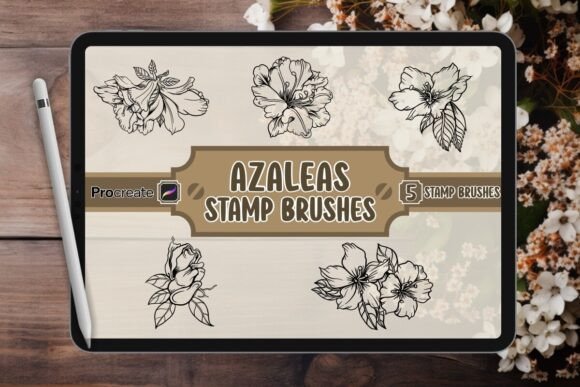
At its core, this resource is a .brushset file containing five distinct, high-resolution Azalea silhouettes. These aren't generic clip-art shapes; they are intricately hand-drawn figures that capture the essence of the flower in various states of bloom and shadow. Whether you are an illustrator looking to speed up your background creation or a designer needing a specific motif for a client project, these stamps offer a level of detail that is difficult to replicate manually in a short timeframe.
Understanding the Tool and Its Workflow
Before diving into applications, it is helpful to understand exactly what you are working with. The download package includes the Procreate brush file, a JPG preview so you can see the assets before importing them, and a "Read Me" PDF with installation instructions. Once installed, the brushes function as stamps. You simply tap the canvas to place an Azalea silhouette, then use the transform tool to resize, rotate, or layer them.
The magic lies in the versatility of the stamping mechanic. Unlike a static image import, using these as brushes allows you to control opacity, blend modes, and color dynamically within your current project. You can paint over them with watercolor effects, turn them into stencils for texture, or keep them as crisp black-and-white silhouettes. This flexibility makes the Azaleas Brush Stamp Set for Procreate a foundational element rather than just a decorative add-on.
Real-World Applications for Creators and Professionals
The true value of any digital asset is measured by how well it solves problems in real-world scenarios. Here is how different types of users can leverage these Azalea silhouettes to achieve professional results.
For Book Cover Designers and Publishers
Authors and publishers often struggle with creating covers that convey a specific mood without overwhelming the typography. A fantasy novel about a lost garden or a romance set in the countryside needs atmospheric depth. Instead of commissioning a full custom illustration which can be costly and time-consuming, a designer can use the Azalea silhouettes to create a layered background. By adjusting the opacity and blending the stamps with a textured paper overlay, you can create a sense of mystery and depth. The hand-drawn quality ensures the flowers don't look like cheap stock photos, maintaining the artistic integrity required for a professional book cover.
Social Media Managers and Content Creators
In the fast-paced world of social media, consistency is key, but variety keeps audiences engaged. Bloggers and influencers focusing on lifestyle, gardening, or wellness themes need graphics that resonate with their niche. Imagine creating a series of Instagram posts for spring. Using the Azaleas Brush Stamp Set for Procreate, you can quickly generate unique frame borders, watermark backgrounds, or accent elements for quote cards. Because the silhouettes are scalable, they look sharp whether used on a mobile screen or a large desktop banner. This efficiency allows content creators to maintain a high output without sacrificing visual quality.
Merchandise and Product Designers
Small business owners selling t-shirts, tote bags, or stickers often need designs that stand out in a crowded market. The "wild side" aesthetic mentioned in the product description is perfect for streetwear or eco-conscious brands. A designer might take one of the larger Azalea figures, invert the colors, and combine it with bold typography to create a striking logo or print. The ability to layer multiple stamps creates a dense, pattern-like effect that looks expensive and handcrafted, adding perceived value to physical products.
Educational Materials and Planners
Teachers and digital planner creators also benefit from these assets. When designing worksheets, flashcards, or journal templates, having access to high-quality nature illustrations adds an engaging element for students or users. An educator teaching botany could use the silhouettes to highlight different parts of a flower, while a digital planner user might use them to decorate monthly spreads dedicated to spring planting schedules. The simplicity of the silhouette style ensures that text remains legible even when placed over the floral elements.
Why Hand-Drawn Silhouettes Matter
You might wonder why you would choose these specific brushes over searching for free images online. The answer lies in the "hand-drawn" aspect. Computer-generated vectors often have a mathematical perfection that feels cold. The Azaleas in this set possess slight irregularities—the way a petal curls slightly more on one side, or the jagged edge of a leaf—that mimic reality. This imperfection is what gives digital art soul.
Furthermore, because they are integrated directly into Procreate, they become part of your creative flow. You don't have to switch apps or worry about file formats. If you are in the middle of painting a scene and realize it needs a touch of flora, you can grab the brush and stamp it instantly. This seamless integration saves valuable minutes that add up to hours over the course of a week.
Considerations Before You Start
While the Azaleas Brush Stamp Set for Procreate is powerful, it is important to approach it with a clear vision. Since the set contains five distinct figures, it is best suited for projects where repetition or variation of a single theme is desired. If you need a vast array of different flower species, this specific set serves as a focused toolkit rather than a comprehensive library.
Additionally, consider the scale of your project. High-resolution stamps are excellent for print materials like posters and books, but always test your final design at 100% zoom to ensure the edges remain crisp. For web-only graphics, you may find that you can manipulate the opacity more aggressively to create softer, dreamier effects. Finally, remember that these are starting points. The most compelling artwork comes from combining these stamps with your own textures, lighting effects, and color palettes. Don't just drop them onto a white background; let them interact with the rest of your composition.
Unlocking Your Creative Potential
Creativity often stalls when we face a blank canvas. Tools like the Azaleas Brush Stamp Set remove that barrier to entry, providing immediate inspiration and structure. Whether you are an entrepreneur branding a new eco-friendly line, a blogger illustrating a seasonal post, or an artist exploring nature themes, these brushes offer a practical solution to a common problem: how to incorporate complex natural forms efficiently.
By leveraging the hand-crafted quality of these silhouettes, you elevate your work from generic to bespoke. You are not just using a template; you are utilizing a set of digital building blocks designed to help you tell your story with the majesty of the wilderness. So, load up Procreate, install the .brushset, and start stamping your way to a more vibrant, textured, and authentic portfolio.