Unleash Your Creativity with the Bush Brush Stamp Set for Procreate
Digital art often struggles to capture the organic, untamed feel of the natural world. Lines can look too perfect, and shapes can feel sterile. That is where the Bush Brush Stamp Set for Procreate changes the game. This collection is not just a pack of digital stickers; it is a toolkit designed to inject the raw, mysterious essence of the wilderness into your illustrations. Whether you are designing a book cover, creating social media graphics, or painting a mystical landscape, these hand-drawn silhouettes offer a shortcut to authenticity that standard drawing tools simply cannot match.
However, having access to high-quality assets is only half the battle. Many artists, from beginners to seasoned professionals, make critical errors when integrating stamp sets into their workflow. These mistakes can lead to stiff compositions, wasted time, and a final product that looks more like a collage than a cohesive piece of art. Understanding how to properly evaluate, download, and apply this specific brush set is essential for maximizing its potential.
The Reality Behind Digital Stamps: What You Are Actually Getting
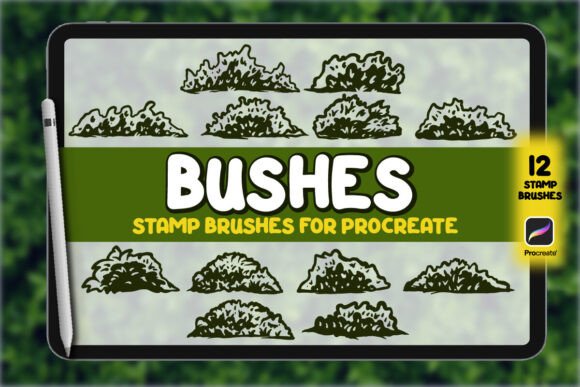
Before diving into the application, it is crucial to understand exactly what the Bush Brush Stamp Set for Procreate entails. The package typically includes a .brushset file containing 12 distinct bush figures, a JPG preview, and a Read Me.pdf guide. While this sounds straightforward, the "stamp" nature of these brushes is often misunderstood.
A common misconception is that these stamps will automatically blend seamlessly into any background without effort. They will not. A stamp is a fixed shape. If you simply tap them onto a canvas without adjusting opacity, blending modes, or layering, they will float awkwardly on top of your artwork. The value of this set lies in its versatility, but that versatility requires active manipulation. The hand-drawn silhouettes are high-resolution, meaning they retain crisp details even when scaled up, but they still need to be treated as part of a larger ecosystem within your Procreate project.
Common Pitfalls When Using Nature Silhouettes
Even experienced creators can fall into traps when using pre-made assets. Here are the most frequent issues that degrade the quality of work involving the Bush Brush Stamp Set for Procreate, along with practical corrections.
Overusing Identical Shapes
The most immediate sign of over-reliance on a stamp set is repetition. If you use the same bush silhouette three times in a single composition, the viewer's eye will immediately spot the pattern. This breaks immersion and makes the artwork look cheap or automated. The set contains 12 figures, which provides variety, but relying solely on those 12 without modification limits your creative range.
The Fix: Never place two identical stamps side-by-side. Use the Transform tool to rotate, scale, and flip the silhouettes. In Procreate, you can also use the Liquify tool to gently warp the edges of a bush, making one side denser or more sparse. By altering the geometry slightly, you trick the eye into seeing unique vegetation rather than a repeated asset.
Ignoring Lighting and Depth
Another frequent mistake is treating every stamp as a flat, black object. In nature, bushes have depth, shadows, and varying densities. Placing a solid black silhouette over a complex background without considering light direction creates a "sticker effect." This flattens your image and destroys the sense of atmosphere you are trying to build.
The Fix: Utilize Procreate's layer blending modes. Instead of leaving the stamp on the default "Normal" mode, try switching to "Multiply" to let the background texture show through the gaps in the leaves. Add a subtle shadow layer beneath the bush to ground it. If your scene has a specific light source, use a low-opacity airbrush to add highlights to the edges of the silhouette facing the light. This simple step transforms a flat shape into a volumetric element.
Skipping the Preview and Documentation
Rushing the download process is a costly error. Many users grab the .brushset file immediately without opening the included JPG preview or the Read Me.pdf. This leads to confusion about installation or disappointment if the style doesn't match expectations.
The Fix: Always review the preview images first. Check the complexity of the lines and the overall aesthetic. Does the jagged edge of these specific bushes fit your current project? Then, read the PDF. It often contains installation instructions specific to the latest version of Procreate. Ignoring these steps can result in installation errors or missing features, wasting valuable creation time.
Evaluating Quality Before You Buy or Download
When browsing for digital assets like the Bush Brush Stamp Set for Procreate, quality varies significantly between sellers. A high-resolution stamp is useless if the line work is muddy or inconsistent. Before committing to a purchase or download, consider these evaluation criteria:
- Resolution Integrity: Zoom in on the preview images. Do the edges pixelate? High-quality stamps should remain crisp at 100% zoom. If the edges look fuzzy, scaling them up for a poster or large print will result in a blurry mess.
- Style Consistency: Ensure all 12 figures share a consistent stroke weight and artistic style. A mix of thick, cartoonish lines and thin, realistic strokes within the same set can make your composition look disjointed.
- File Compatibility: Verify that the .brushset file is compatible with your current version of Procreate. Older files sometimes fail to import correctly on newer iPads, leading to frustration.
Practical Strategies for Better Integration
To truly leverage the Bush Brush Stamp Set for Procreate, think of it as a starting point rather than a finished product. The goal is to make the viewer forget that you used a stamp at all.
Start by building your background first. Once you have your sky, mountains, or forest floor established, bring in the bushes as mid-ground or foreground elements. Use the "Clip Mask" feature in Procreate to paint textures directly onto the bush silhouette. For example, if your scene is autumnal, clip a layer of orange and brown colors inside the bush shape to give it seasonal color without losing the intricate silhouette details.
Furthermore, vary the opacity. Not every bush needs to be fully opaque. Distant bushes should be lighter and less detailed. By lowering the opacity of the stamp and adding a slight blur, you can create atmospheric perspective, pushing the bush further back into the scene naturally.
Who Benefits Most from This Tool?
This set is particularly valuable for a wide range of creators. Freelancers and small business owners looking to create quick, high-quality logos or social media graphics will appreciate the speed. Educators and bloggers can use these silhouettes to illustrate nature-themed content without needing advanced drawing skills. However, the true power of the Bush Brush Stamp Set for Procreate is unlocked by those who treat it as a flexible component of their design system, not a crutch.
Whether you are an entrepreneur branding a new eco-friendly product or a hobbyist painting a fantasy map, the key to success lies in how you manipulate the assets. Avoid the trap of lazy repetition. Embrace the tools Procreate offers to modify, color, and blend these silhouettes. By doing so, you ensure that your digital artwork retains the mystique and untamed beauty of the wild, rather than looking like a generic template.
Remember, the best digital art feels human. Even when using pre-made stamps, your input—your choices on lighting, placement, and variation—is what breathes life into the piece. Take the time to learn the nuances of the Bush Brush Stamp Set for Procreate, and you will find that it becomes an indispensable part of your creative arsenal.