Peony Brush Stamp Set for Procreate
Digital art often thrives on the balance between technical precision and organic spontaneity. For artists working within the iPad ecosystem, bridging the gap between rigid vector lines and the fluid chaos of nature can be challenging. The Peony Brush Stamp Set for Procreate addresses this need directly by offering a curated collection of hand-drawn botanical elements designed to inject life and texture into your digital canvas. Unlike standard geometric shapes or generic clip art, these stamps capture the intricate details of peonies in silhouette form, allowing you to layer complexity without spending hours rendering every petal from scratch.
The Power of Hand-Drawn Silhouettes
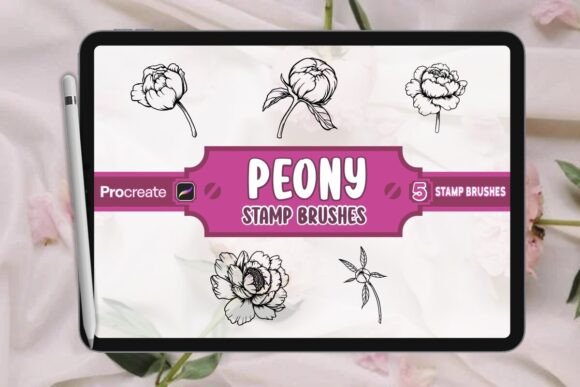
At the core of this tool is its origin: human craftsmanship. Each of the five peony figures included in the .brushset file has been meticulously drawn to preserve the natural asymmetry and depth found in real flora. In digital design, symmetry can sometimes feel sterile. By utilizing these hand-drawn silhouettes, you introduce an element of authenticity that resonates with audiences looking for genuine artistic expression.
The focus on silhouettes is particularly strategic. A silhouette strips away color and internal detail, leaving only the shape and form. This makes the Peony Brush Stamp Set for Procreate incredibly versatile. You are not locked into a specific color palette or shading style. Instead, you receive the structural integrity of the flower, which you can then adapt to any lighting condition, mood, or artistic direction. Whether you need a dark, moody outline for a gothic illustration or a clean white shape for a minimalist poster, the underlying form remains robust and recognizable.
Seamless Integration into Your Workflow
Efficiency is a critical component of professional creativity. The last thing a designer wants is a brush set that requires complex installation or fails to render correctly. These brushes are engineered specifically for the Procreate environment. Upon importing the .brushset file, the tools appear immediately in your brush library, ready for use.
The workflow is intuitive. With a single tap, you place a stamp onto your canvas. From there, the power lies in manipulation. You can resize the stamp to create foreground focal points or background textures. You can rotate the angle to match the flow of your composition. Most importantly, because these are brushes, they respect your layer structure. You can stack multiple peony stamps on different layers, apply blending modes like Multiply or Overlay, and mask them to interact with other elements in your artwork. This flexibility transforms a simple stamp into a dynamic building block for complex illustrations.
Creative Applications Across Industries
The utility of the Peony Brush Stamp Set for Procreate extends far beyond personal sketching. It serves as a functional asset for various creative professionals who need high-quality botanical imagery quickly.
- Book Cover Design: Publishers often seek covers that convey genre and tone instantly. A large, bold peony silhouette can anchor a fantasy novel cover, while smaller, scattered petals might suggest a romance or literary fiction theme. The high resolution ensures these images remain crisp even when printed on large paperback formats.
- Branding and Logos: Small business owners in the wellness, beauty, or artisan sectors often require logos that feel organic yet professional. Using a simplified peony silhouette allows for a mark that scales well across business cards, social media avatars, and website headers without losing clarity.
- Social Media Graphics: Content creators and marketers know that visual consistency drives engagement. These stamps allow you to create a cohesive series of posts. Imagine a monthly calendar where each date is marked by a unique arrangement of peony silhouettes, creating a branded aesthetic that stands out in a crowded feed.
- Textile and Surface Pattern Design: Fashion designers and surface pattern artists can utilize the stamps to create repeating motifs. By varying the size and rotation of the peony figures, you can generate seamless patterns for fabric, wallpaper, or packaging designs.
Adapting Styles for Different Audiences
One of the greatest strengths of this set is its ability to shift styles based on how you apply it. If your target audience appreciates modern minimalism, keep the strokes clean and use the silhouettes sparingly against vast negative space. Conversely, if you are targeting an audience that loves maximalist, baroque aesthetics, layer the stamps heavily. Overlap the petals, add texture overlays, and experiment with opacity to create a dense, lush tapestry.
For educators and hobbyists teaching digital art, these brushes offer a practical way to demonstrate composition. Students can learn about balance, rhythm, and focal points by arranging the pre-made shapes rather than struggling with the mechanics of drawing a flower from memory. This lowers the barrier to entry, allowing learners to focus on the principles of design.
Maintaining Quality and Consistency
While the convenience of stamp sets is undeniable, maintaining a professional look requires discipline. To ensure your results remain clear and effective, consider the following recommendations:
- Vary Your Scale: Avoid using the same size stamp repeatedly. A composition feels more natural when there is a hierarchy of sizes—large anchors, medium fillers, and tiny accents.
- Experiment with Opacity: Don't always work at 100% opacity. Lowering the opacity of background stamps can create depth and atmospheric perspective, making the foreground elements pop.
- Combine with Other Brushes: Use the Peony Brush Stamp Set as a foundation, but enhance it with Procreate's native brushes. Add watercolor washes behind the silhouettes or use ink brushes to define edges. This hybrid approach keeps your work original and prevents it from looking like a collage of stock assets.
- Check Resolution: Although the stamps are high-resolution, always ensure your canvas settings in Procreate match your final output requirements. If you are designing for print, start with a canvas sized at 300 DPI to guarantee the crispness of the silhouettes translates perfectly to physical media.
Unlocking New Creative Directions
The Peony Brush Stamp Set for Procreate is more than just a collection of images; it is a catalyst for new ideas. When you remove the pressure of drawing perfect flowers, your mind is free to explore composition, color theory, and narrative. Perhaps you will use the silhouettes to frame a portrait, creating a natural vignette. Maybe you will invert the colors to create a striking negative-space effect. The possibilities are limited only by your imagination.
Whether you are a seasoned illustrator looking to speed up your process or a beginner eager to create professional-looking designs, this tool offers a reliable path forward. It combines the efficiency of digital assets with the soul of hand-drawn art, ensuring that your work retains a human touch in an increasingly automated world. By integrating these peony silhouettes into your toolkit, you gain the ability to bring the untamed beauty of nature to your screen with just a few taps, elevating your digital artwork to new heights of sophistication and appeal.