Feather Line Art Stamp Brush: A Practical Evaluation
Digital illustration often requires a balance between the organic feel of traditional media and the efficiency of digital tools. The Feather Line Art Stamp Brush represents a specific category of assets designed to bridge this gap, offering artists a way to incorporate intricate botanical elements without the time investment of drawing each stroke from scratch. This evaluation explores what these brushes are, how they function within creative workflows, and whether they align with your specific artistic goals.
Understanding the Feather Line Art Stamp Brush
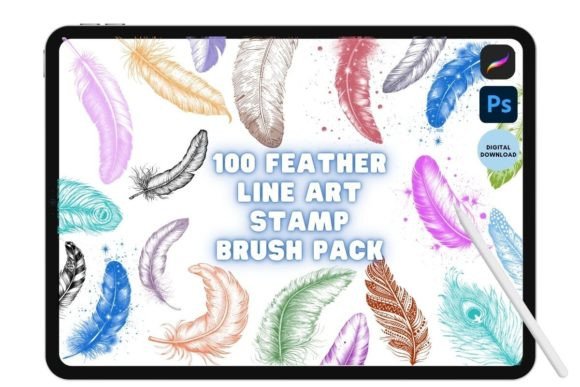
The Feather Line Art Stamp Brush is not a single tool but a collection of digital assets, typically comprising 100 unique designs. These are pre-rendered illustrations of feathers, rendered in line art style, packaged as stamp brushes for software like Procreate on iPad or Adobe Photoshop on desktop. Unlike standard calligraphy or texture brushes that react to pressure and tilt to create new shapes, stamp brushes function by placing a static image onto the canvas at the point of contact.
Each stamp in the set is meticulously crafted to provide detailed line art. This means the complexity of the feather's structure—the barbs, the shaft, and the delicate edges—is already resolved within the brush tip. When an artist activates the brush and taps the screen or canvas, the complete design appears instantly. This functionality distinguishes it from procedural brushes that generate patterns algorithmically; here, every instance is a fixed, high-quality graphic element ready for immediate use.
Reasons to Consider This Tool
Artists and designers might be interested in the Feather Line Art Stamp Brush for several practical reasons. The primary driver is usually efficiency. Creating realistic or stylized feathers by hand requires significant skill and time, particularly when consistency is required across multiple elements in a single piece. If a project demands a pattern of fifty identical or slightly varied feathers, drawing them individually can become a bottleneck in the creative process.
Furthermore, these brushes serve as excellent starting points for more complex compositions. An illustrator might place a few stamps to establish a motif and then modify them using layer effects, blending modes, or manual erasing to create a custom look. For those working on surface pattern design, wallpaper textures, or textile prints, having a library of 100 unique variations allows for rapid prototyping of layouts without the need to source external clipart, which can sometimes lack stylistic cohesion.
Benefits and Workflow Integration
The most significant benefit of utilizing the Feather Line Art Stamp Brush is the immediate availability of high-quality detail. Because the line work is pre-defined, users avoid the frustration of shaky hands or inconsistent line weights that can occur during freehand drawing. This is particularly useful for artists who excel at composition and color theory but may find technical rendering of fine details challenging.
Integration into existing workflows is straightforward, though it varies slightly depending on the software platform:
- For Procreate Users: After purchase, you will receive a link to download the files. To install, open the link directly on your iPad. Locate the
.brushsetfile and select "Open With," choosing Procreate from the list. The application will automatically load the brushes into your library, making them immediately accessible under a new folder. - For Photoshop Users: The installation process involves the
.abrfile format. Once downloaded, simply click and drag the file into the Photoshop interface. The brushes will populate your brush picker, ready for use.
This ease of installation ensures that there is minimal friction between acquiring the asset and beginning production. Once imported, the stamp set can be used to create illustrations, designs, and patterns with just a few steps, streamlining the transition from concept to execution.
Tradeoffs and Considerations
While efficient, the use of stamp brushes comes with inherent tradeoffs that potential users must weigh. The primary limitation is flexibility. Because the image is static, the feather cannot naturally adapt to the flow of a subject's movement in the same way a hand-drawn line would. If a feather needs to curve around a bird's wing or bend in the wind, a simple stamp may appear rigid unless manually manipulated.
Additionally, overuse of the same stamp can lead to a repetitive, "stamped" look that lacks the organic variation found in nature. Even with 100 unique options, if an artist relies too heavily on a few favorites, the final illustration may lose its hand-crafted authenticity. It requires a disciplined approach to spacing, rotation, and scaling to maintain visual interest.
Another consideration is the nature of the product itself. This is an Instant Download digital product only; no physical items will be shipped. Buyers must be comfortable managing their own digital files and ensuring they have the necessary software versions to support the brush formats. There is no tangible product to hold, and the value lies entirely in the utility of the digital files.
Ideal Use Cases
The Feather Line Art Stamp Brush is a strong fit for specific situations where speed and consistency are paramount. It is ideal for:
- Pattern Designers: Creating seamless repeats for fabric, wrapping paper, or digital backgrounds where uniformity is desired.
- Graphic Novelists and Storyboard Artists: Quickly adding background details or atmospheric elements to sketches without slowing down the narrative flow.
- Logo and Icon Design: Using the clean lines as a base for vectorizing or refining into branding assets.
- Beginner Digital Artists: Those building confidence in composition who want to produce polished results while still developing their freehand skills.
In these scenarios, the ability to import the stamp set and start using it in illustrations with just a few steps provides a distinct advantage over traditional methods.
When Alternatives May Be Better
Despite its advantages, there are situations where alternatives may be worth considering. If your goal is to capture the unique, imperfect beauty of a specific, real-world feather, photographing one and tracing it, or drawing it from life, will yield superior realism. Similarly, if you are creating a highly dynamic scene where feathers interact physically with other objects—tangling, breaking, or flowing in a specific direction—a stamp brush may require so much manual editing (distorting, warping, erasing) that it becomes faster to draw the element from scratch.
Artists who prioritize the tactile experience of drawing and wish to improve their muscle memory for rendering organic forms might also find that relying on stamps hinders their development. In such cases, using reference photos and practicing freehand strokes, even if slower, offers long-term benefits to skill acquisition.
Decision-Making Insights
To determine if the Feather Line Art Stamp Brush aligns with your goals, consider your current workflow bottlenecks. Are you spending excessive time on repetitive details? Do you struggle with maintaining consistent line quality across large areas? If the answer is yes, this tool offers a practical solution that enhances productivity without compromising the aesthetic of line art.
However, if your project demands hyper-realism or extreme dynamic interaction, or if your primary objective is skill-building through practice, you may find the limitations of a static stamp outweigh the benefits. Ultimately, the value of these brushes lies in how they are integrated. They are most effective when used as components within a larger, mixed-media workflow rather than as a replacement for fundamental drawing techniques.
By understanding both the capabilities and the constraints of the Feather Line Art Stamp Brush, you can make an informed decision about whether this digital asset will enhance your creative output or if your specific needs are better served by alternative methods.