Fall Pumpkin Alphabet Brush Set: A Practical Guide for Better Digital Art
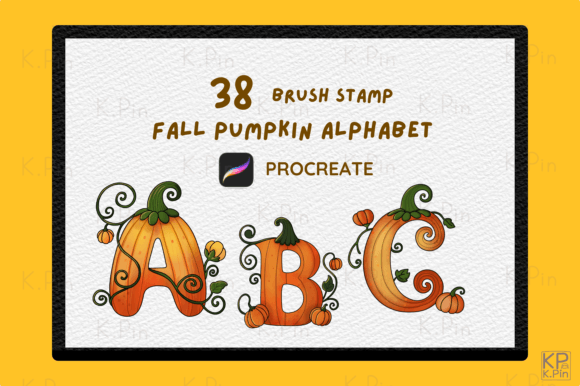
Adding a seasonal flair to your digital artwork often feels like searching for the perfect balance between whimsy and professionalism. When you need to create autumn-themed invitations, Halloween posters, or cozy greeting cards, the right tools make all the difference. The Fall Pumpkin Alphabet Brush Set offers exactly that solution, providing 38 unique brush stamps of beautifully crafted pumpkin-themed letters designed specifically for Procreate. These high-quality brushes allow you to add a festive touch to your designs instantly, ensuring your projects stand out in a crowded digital marketplace.
However, simply downloading a new asset does not guarantee success. Many creators rush into using new brushes without understanding their specific constraints or potential pitfalls. To truly leverage this tool, you need to approach it with a clear understanding of its capabilities and limitations. Let's explore how to use these resources effectively while avoiding common mistakes that can ruin your workflow or compromise the quality of your final piece.
Understanding What You Are Actually Getting
Before you integrate any new asset into your creative process, it is crucial to understand exactly what you are working with. The Fall Pumpkin Alphabet Brush Set is not a traditional lettering brush where you draw each stroke manually. Instead, it consists of stamp brushes. This distinction is vital. When you tap the screen, the entire character appears as a pre-designed image. This is excellent for consistency and speed, but it means you cannot change the font style mid-word or alter the kerning as easily as you would with vector text.
The set includes a single zipped file containing a .brushset file with 38 stamps. This covers the full alphabet, allowing you to spell out words, titles, and short phrases. It is an efficient way to generate eye-catching autumn and Halloween projects without spending hours drawing individual pumpkins for every letter. Yet, treating these stamps like standard text layers can lead to frustration later if you do not plan your layout carefully.
Common Compatibility Oversights
One of the most frequent errors creators make when purchasing digital assets is ignoring version compatibility. For this specific collection, there is a hard requirement: the stamp brushes are suitable only for Procreate Version 5.0 and higher on iPad or iPad Pro. If you are still using an older version of the app, perhaps because you have not updated your device recently, these files will not import correctly. They may appear blank, fail to load, or cause the app to crash upon opening the project.
This oversight can waste valuable time. Imagine spending twenty minutes setting up your canvas, only to discover your new brushes are unusable because your software is outdated. To avoid this, check your Procreate version immediately after purchase. Go to the App Store on your iPad, search for Procreate, and ensure you have the latest update installed. If your device is too old to support version 5.0 or higher, you will need to consider upgrading your hardware before investing in this set.
Avoiding Design Pitfalls with Stamp Brushes
While stamp brushes offer convenience, they come with design challenges that beginners often overlook. Because each letter is a fixed image, spacing can become inconsistent if you rely solely on the default settings. Unlike dynamic fonts that adjust kerning automatically, stamp brushes require manual adjustment. If you place letters too close together, the pumpkin stems might overlap awkwardly, creating a cluttered look. Conversely, placing them too far apart can break the visual rhythm of the word.
To correct this, treat each letter as an individual object. Use the selection tool in Procreate to move characters precisely until the spacing feels natural. Zoom in to check the alignment of the stems and leaves. A better approach is to type your phrase on a separate layer first using a standard font to establish the baseline and spacing, then trace over it with the pumpkin stamps. This ensures your message remains legible while maintaining the festive aesthetic.
Another common mistake is neglecting color variation. Since the brushes likely come in a default orange or brown hue, applying them directly can sometimes result in a flat, one-dimensional appearance. To elevate your work, use Procreate's blending modes or adjust the opacity. Try duplicating the stamped layer and changing the blend mode to "Multiply" or "Overlay" to add depth. You can also use the color drop tool to tint the stamps slightly differently, mimicking the natural variation found in real pumpkins.
Evaluating Value and Workflow Efficiency
When deciding whether to buy the Fall Pumpkin Alphabet Brush Set, consider your long-term needs. Is this a one-time project, or will you be creating seasonal content regularly? For small business owners, bloggers, or marketers who produce recurring holiday graphics, the time saved by using pre-made stamps is significant. It streamlines the creation of invitations, posters, and social media posts, allowing you to focus on other aspects of your campaign.
However, if you are looking for a custom, hand-drawn lettering style for a brand identity, these stamps might be too generic. They are ideal for decorative purposes rather than primary body text. Using them for large blocks of text can look unprofessional and difficult to read. Reserve these brushes for headlines, logos, or accent phrases where their thematic charm adds value without sacrificing readability.
Best Practices for Download and Installation
Proper installation is key to a smooth experience. Once you receive the zipped file, do not try to open it directly from your email or messaging app. Instead, save the file to your Files app on your iPad. Unzip the folder to reveal the .brushset file. Then, open Procreate, go to the Brush Library, and tap the three dots in the top right corner. Select "Import" and choose the unzipped file. This method ensures the brushes load correctly into your library.
If you skip the unzipping step, Procreate will not recognize the file format, leading to errors. Taking this extra minute prevents technical headaches down the line. Additionally, organize your brushes by creating a new category named "Seasonal" or "Autumn." This keeps your workspace tidy and makes it easier to find the Fall Pumpkin Alphabet Brush Set when you need it quickly during a deadline.
Maximizing Your Creative Potential
The true power of these tools lies in how you combine them with other elements. Do not limit yourself to just the letters. Use the pumpkin shapes within the stamps as standalone decorative elements. Scatter smaller pumpkin icons around your text to frame it, or use them as bullet points for lists on greeting cards. This versatility transforms a simple alphabet set into a comprehensive design kit.
For educators and hobbyists, these brushes can bring a fun, interactive element to digital lessons or personal journals. They encourage creativity without requiring advanced drawing skills. By understanding the mechanics of stamp brushes and planning your layout thoughtfully, you can avoid common traps and produce professional-grade autumn art. Remember, the goal is to enhance your design, not let the tool dictate it. With careful application, the Fall Pumpkin Alphabet Brush Set becomes an invaluable asset in your digital toolkit, helping you create memorable, festive projects that resonate with your audience.