Dahlia Brush Stamp Set for Procreate
Digital art often thrives on the balance between technical precision and organic chaos. While vector tools offer clean lines, they can sometimes lack the tactile soul of traditional media. The Dahlia Brush Stamp Set for Procreate bridges this gap, offering artists a way to inject wild, natural energy into their digital canvases with a single tap. This collection is not merely a set of images; it is a toolkit designed to streamline your workflow while adding layers of texture and depth that mimic hand-drawn illustrations.
For creators who value efficiency without sacrificing artistic integrity, these brushes provide an immediate solution. Instead of spending hours tracing petals or rendering complex botanical details from scratch, you gain access to five distinct, high-resolution Dahlia silhouettes ready for instant application. Whether you are a seasoned illustrator or a beginner exploring the app, this set transforms how you approach floral elements in your design projects.
What Makes This Brush Set Unique?
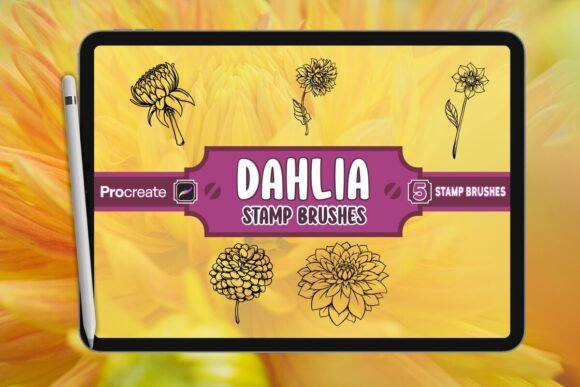
The core value of the Dahlia Brush Stamp Set for Procreate lies in its specific design philosophy: authenticity through simplicity. Unlike generic clipart, these stamps are hand-drawn silhouettes that capture the intricate layering of Dahlia leaves and petals. Each of the five figures included in the .brushset file has been crafted to maintain the majestic essence of the flower while remaining versatile enough for various artistic styles.
One of the most significant advantages is the "Procreate-Ready" nature of the files. There is no need for external conversion or complicated import processes. Once installed, the brushes integrate seamlessly into your workspace. You can tap to stamp, resize, rotate, and blend them just like any other brush stroke. This fluidity allows you to focus on composition rather than technical hurdles. The high-resolution quality ensures that whether you are working on a small social media graphic or a large-format poster, the edges remain crisp and the details stay sharp.
Practical Applications for Designers and Artists
The versatility of the Dahlia silhouettes opens up a wide range of creative possibilities. Because they are presented as stamps, they function exceptionally well as foundational elements in larger compositions. Here is how different professionals can adapt this tool for their specific goals:
- Book Cover Design: Authors and publishers often seek imagery that conveys mystery and elegance. By layering multiple Dahlia stamps with varying opacity levels, you can create moody, atmospheric backgrounds that frame typography effectively. The silhouette style works particularly well for fantasy or romance genres where the interplay of light and shadow is crucial.
- Brand Identity and Logos: Small business owners in the wellness, beauty, or lifestyle sectors can use these stamps to create organic logos. A single, bold Dahlia silhouette can serve as a minimalist icon, instantly communicating a connection to nature and growth. Pairing the stamp with custom typography creates a professional brand mark without the cost of hiring a dedicated logo designer.
- Social Media Graphics: Marketers and bloggers need consistent visual assets that stand out in crowded feeds. Use the Dahlia stamps as framing elements for quotes, product announcements, or event flyers. Their distinct shape adds a unique visual hook that generic stock photos often lack.
- Pattern Creation: Textile designers and surface pattern artists can repeat these silhouettes to generate seamless patterns. By rotating and scaling the five different figures, you can build complex, nature-inspired repeats suitable for fabric, wallpaper, or digital stationery.
Workflow Tips for Maximum Impact
To get the most out of the Dahlia Brush Stamp Set for Procreate, it is essential to understand how to manipulate the stamps beyond simple placement. The true power of these brushes emerges when you treat them as building blocks rather than finished assets.
Layering and Blending
Start by placing a large Dahlia silhouette at the bottom of your canvas. Lower the opacity to create a subtle wash of color. Then, add smaller, more detailed stamps on top using a higher opacity. Experiment with Procreate's blending modes, such as "Multiply" or "Overlay," to merge the stamps with underlying textures. This technique adds depth and prevents the artwork from looking flat or pasted-on.
Color Variation
While the default stamps may appear in black or grayscale, Procreate allows for dynamic coloring. Select the "Color Drop" feature to change the hue of a stamped element instantly. For a more realistic look, use the "Adjustments" menu to shift the saturation or temperature of specific layers. This flexibility means one set of brushes can yield dozens of color variations, from deep burgundies to soft pastels.
Masking and Clipping
To keep your results organized and clean, utilize clipping masks. Draw a base shape or text layer first, then place your Dahlia stamps on a layer above it and enable "Clipped." This confines the floral details strictly within the boundaries of your text or shape, creating sophisticated cut-out effects perfect for posters and invitations.
Adapting Styles for Different Audiences
The same set of brushes can speak to entirely different audiences depending on how they are styled. For a youthful, trendy audience, consider using bright, neon colors and combining the Dahlia stamps with abstract shapes and glitch effects. Conversely, for a mature, luxury market, stick to monochromatic palettes—deep greens, golds, and blacks—and pair the stamps with elegant serif fonts.
Educators and hobbyists can also benefit from these tools by using them to teach principles of composition. Students can learn about negative space, balance, and repetition by arranging the Dahlia figures in different configurations. It provides a low-barrier entry point into complex botanical illustration, allowing learners to achieve professional-looking results quickly.
Installation and Usage Guide
Getting started is straightforward. The package includes a .brushset file, which is the native format for Procreate. To install, simply tap the file on your iPad, select "Open in Procreate," and the brushes will automatically appear in your library under a new folder named "Dahlia." The included JPG preview offers a quick reference for the five available figures, while the Read Me.pdf contains additional tips for troubleshooting or advanced usage.
Remember that while these brushes are powerful, they are most effective when used with intention. Avoid over-cluttering your canvas; sometimes, a single, well-placed Dahlia silhouette makes a stronger statement than a chaotic arrangement of many. By balancing inspiration with practical restraint, you can create work that feels both untamed and professionally polished.
The Dahlia Brush Stamp Set for Procreate is more than a download; it is an invitation to explore the intersection of digital efficiency and organic beauty. Whether you are refining a personal project or delivering a client brief, these tools offer the reliability and creativity needed to elevate your digital artwork to the next level.